

Infisical supports two methods for connecting to AWS.Documentation Index
Fetch the complete documentation index at: https://infisical-saif-eng-4890-add-support-for-oracle-db-access-in.mintlify.app/llms.txt
Use this file to discover all available pages before exploring further.
- Assume Role (Recommended)
- Access Key
Self-Hosted Instance
Self-Hosted Instance
INF_APP_CONNECTION_AWS_ACCESS_KEY_ID and INF_APP_CONNECTION_AWS_SECRET_ACCESS_KEY environment variables are not set, Infisical will automatically retrieve credentials from your instance’s environment (instance profile, task role, or IRSA). Simply ensure that the IAM role attached to your compute has the permission policy below to assume your target roles.Create an IAM User
Create an Inline Policy
{
    "Version": "2012-10-17",
    "Statement": [
{
    "Sid": "AllowAssumeAnyRole",
    "Effect": "Allow",
    "Action": "sts:AssumeRole",
    "Resource": "arn:aws:iam::*:role/*"
}
    ]
}
Obtain the IAM User Credentials
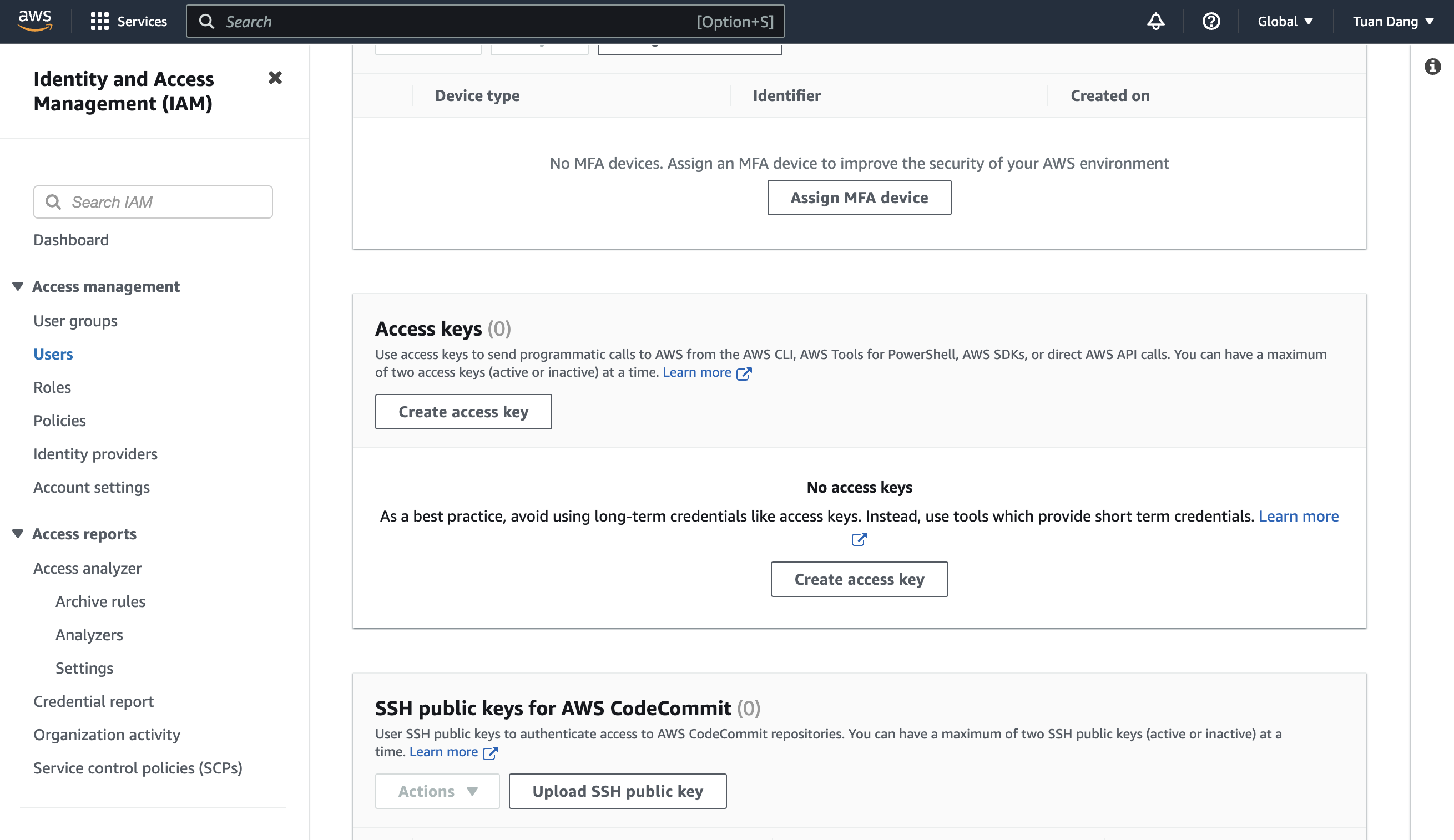
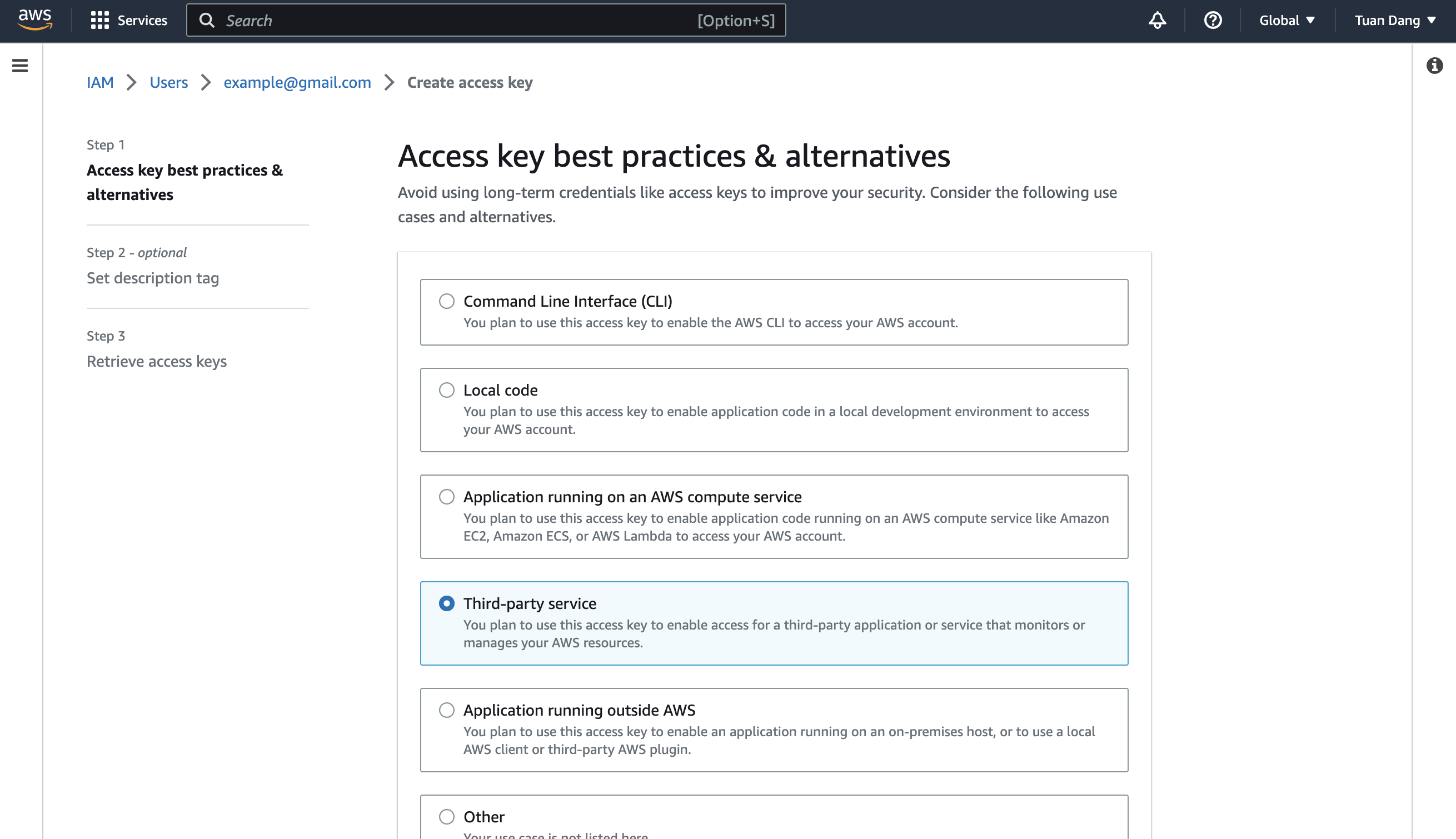
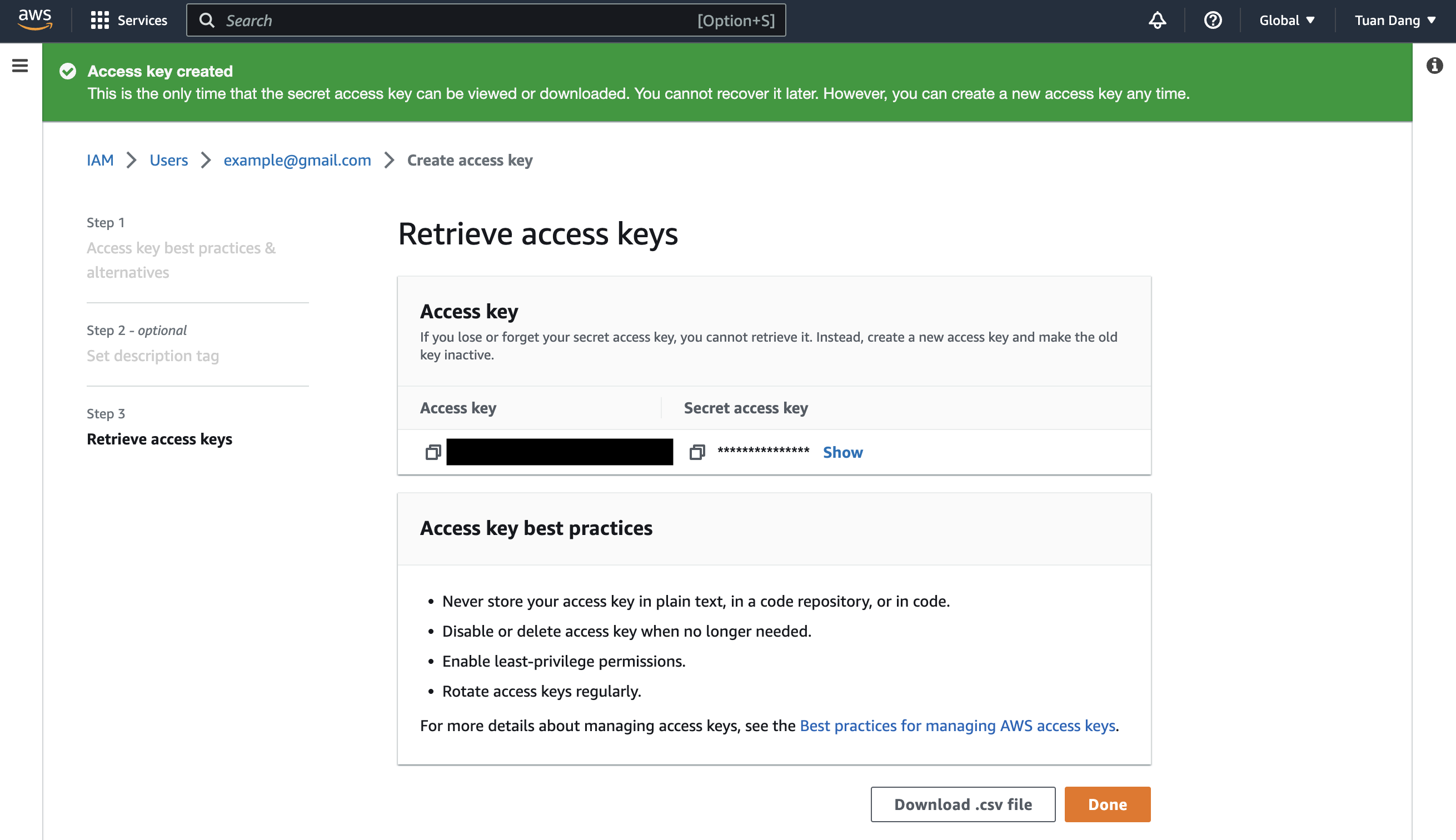
Create the Managing User IAM Role for Infisical
-
Navigate to the Create IAM Role page in your AWS Console.
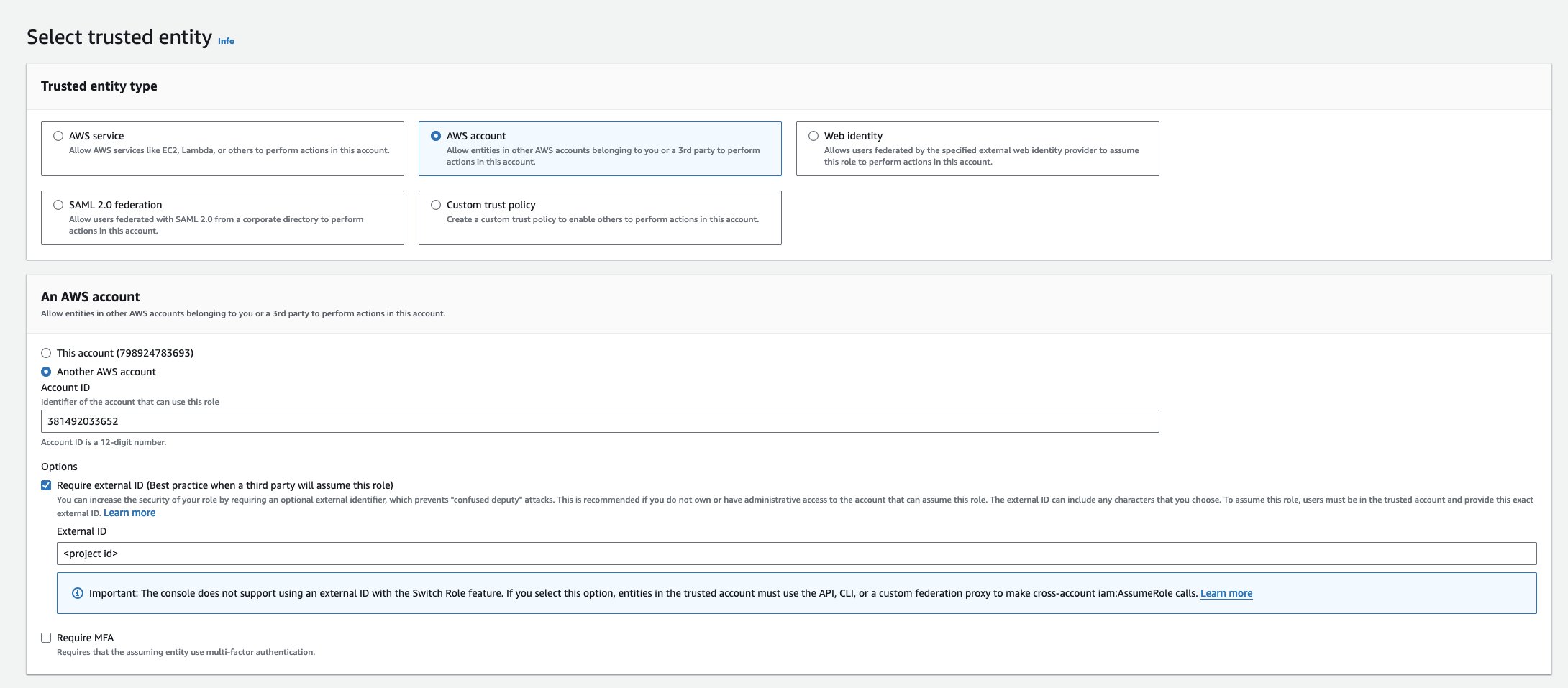
- Select AWS Account as the Trusted Entity Type.
- Select Another AWS Account and provide the appropriate Infisical AWS Account ID: use 381492033652 for the US region, and 345594589636 for the EU region. This restricts the role to be assumed only by Infisical. If self-hosting, provide your AWS account number instead.
- (Recommended) Enable “Require external ID” and input your Organization ID to strengthen security and mitigate the confused deputy problem.
Add Required Permissions to the IAM Role
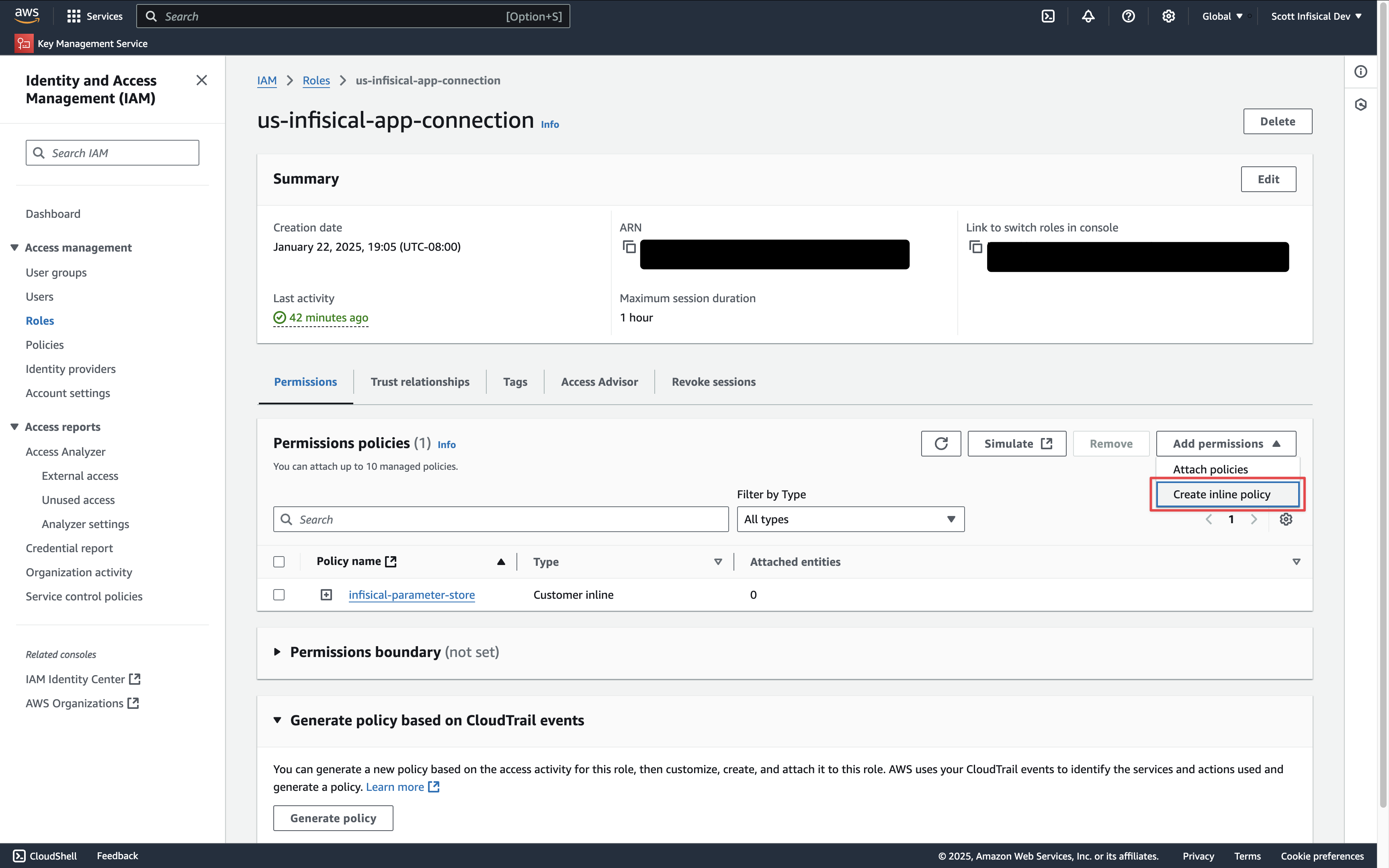 Depending on your use case, add one or more of the following policies to your IAM Role:
- Secret Sync
- Secret Rotation
- PKI Sync
- External Certificate Authority
- PAM Session Recording
AWS Secrets Manager
AWS Secrets Manager
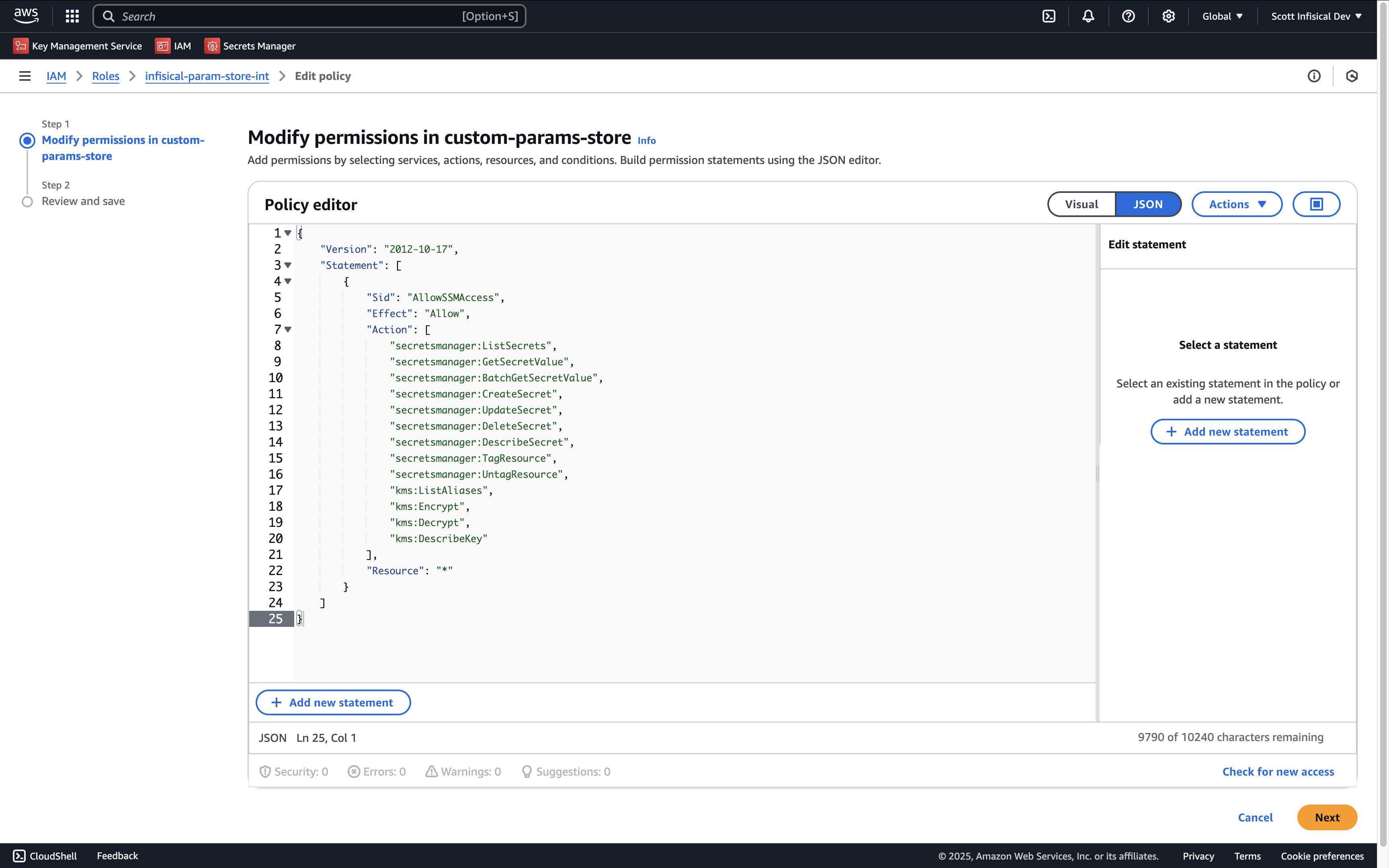
{
    "Version": "2012-10-17",
    "Statement": [
        {
            "Sid": "AllowSecretsManagerAccess",
            "Effect": "Allow",
            "Action": [
                "secretsmanager:ListSecrets",
                "secretsmanager:GetSecretValue",
                "secretsmanager:BatchGetSecretValue",
                "secretsmanager:CreateSecret",
                "secretsmanager:UpdateSecret",
                "secretsmanager:DeleteSecret",
                "secretsmanager:DescribeSecret",
                "secretsmanager:TagResource",
                "secretsmanager:UntagResource",
                "kms:ListAliases", // if you need to specify the KMS key
                "kms:Encrypt", // if you need to specify the KMS key
                "kms:Decrypt", // if you need to specify the KMS key
                "kms:DescribeKey" // if you need to specify the KMS key
            ],
            "Resource": "*"
        }
    ]
}
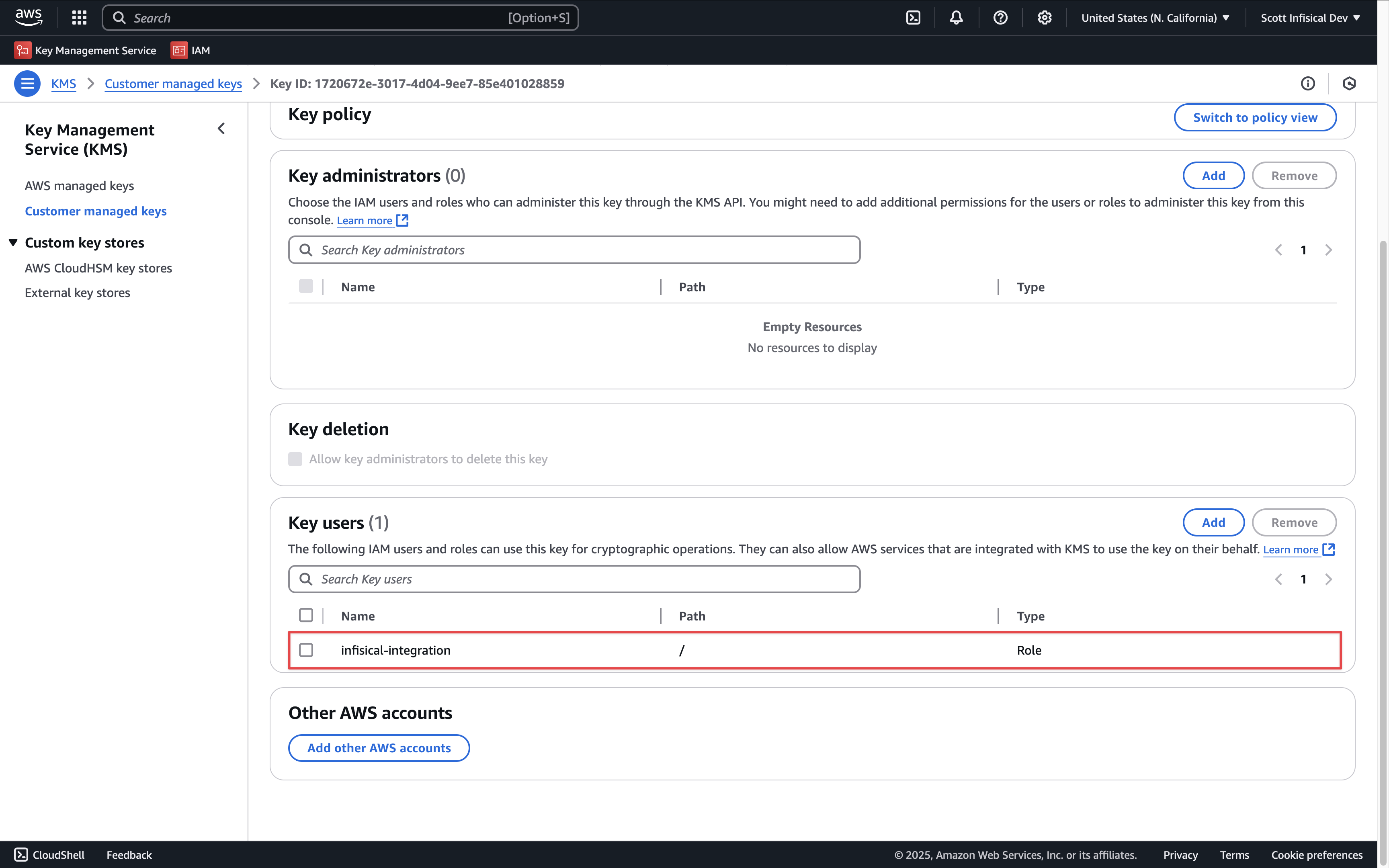
AWS Parameter Store
AWS Parameter Store
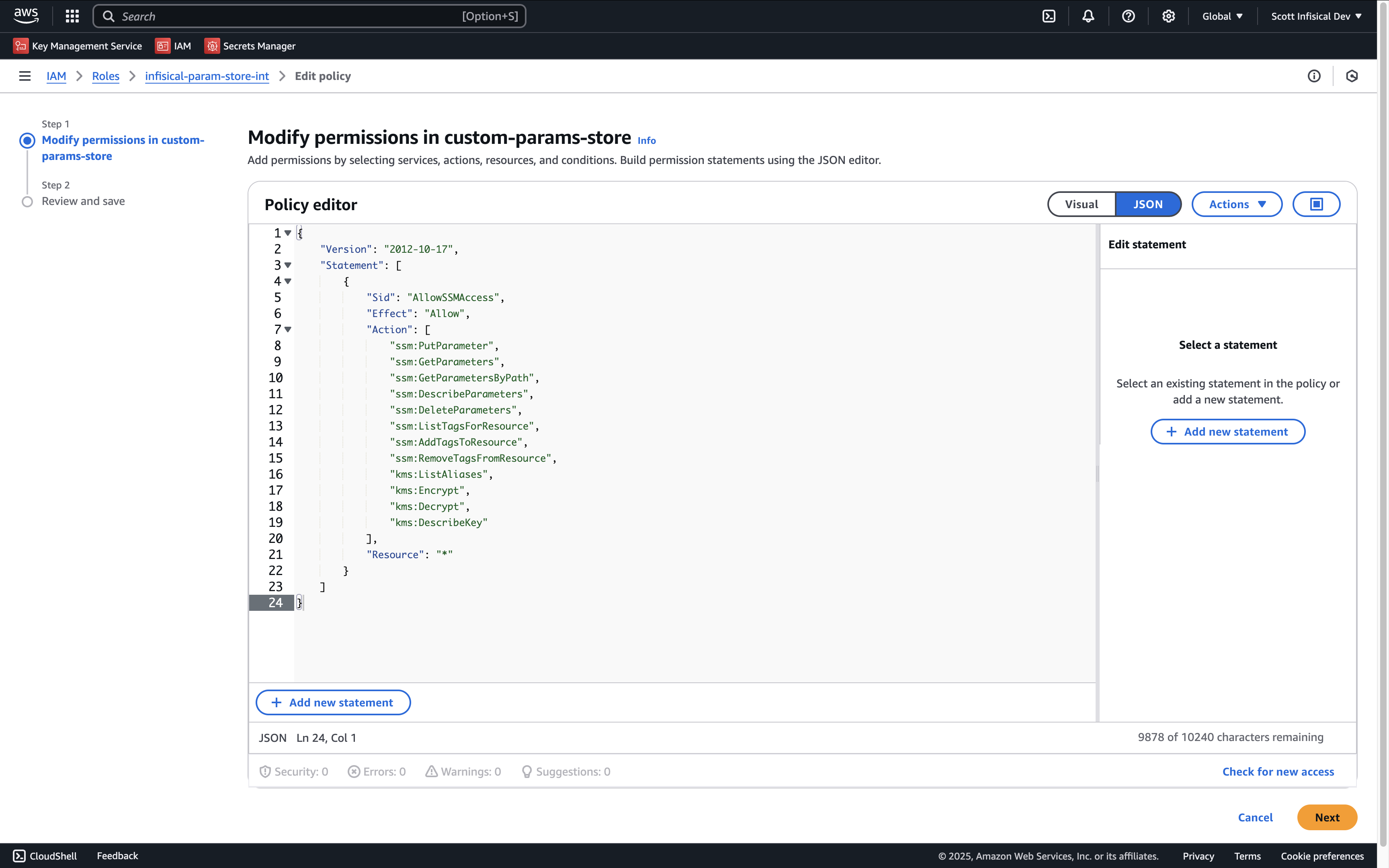
{
    "Version": "2012-10-17",
    "Statement": [
        {
            "Sid": "AllowSSMAccess",
            "Effect": "Allow",
            "Action": [
                "ssm:PutParameter",
                "ssm:GetParameters",
                "ssm:GetParametersByPath",
                "ssm:DescribeParameters",
                "ssm:DeleteParameters",
                "ssm:ListTagsForResource", // if you need to add tags to secrets
                "ssm:AddTagsToResource", // if you need to add tags to secrets
                "ssm:RemoveTagsFromResource", // if you need to add tags to secrets
                "kms:ListAliases", // if you need to specify the KMS key
                "kms:Encrypt", // if you need to specify the KMS key
                "kms:Decrypt", // if you need to specify the KMS key
                "kms:DescribeKey" // if you need to specify the KMS key
            ],
            "Resource": "*"
        }
    ]
}
AWS IAM
AWS IAM
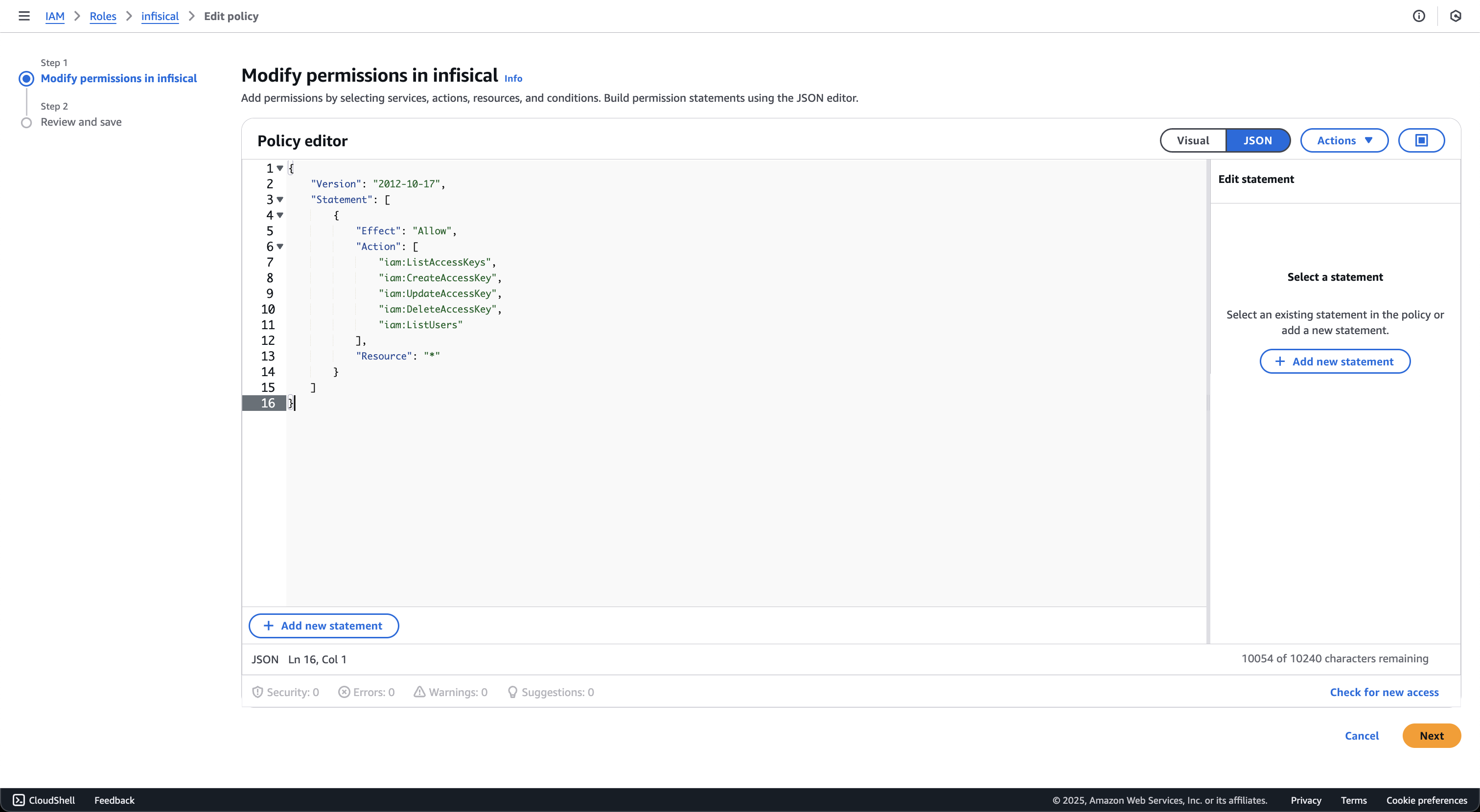
{
    "Version": "2012-10-17",
    "Statement": [
        {
            "Effect": "Allow",
            "Action": [
                "iam:ListAccessKeys",
                "iam:CreateAccessKey",
                "iam:UpdateAccessKey",
                "iam:DeleteAccessKey",
                "iam:ListUsers"
            ],
            "Resource": "*"
        }
    ]
}
AWS Certificate Manager
AWS Certificate Manager
{
    "Version": "2012-10-17",
    "Statement": [
        {
            "Sid": "AllowCertificateManagerAccess",
            "Effect": "Allow",
            "Action": [
                "acm:ListCertificates",
                "acm:DescribeCertificate",
                "acm:GetCertificate",
                "acm:ImportCertificate",
                "acm:ExportCertificate",
                "acm:DeleteCertificate",
                "acm:AddTagsToCertificate",
                "acm:RemoveTagsFromCertificate",
                "acm:ListTagsForCertificate"
            ],
            "Resource": "*"
        }
    ]
}
- ListCertificates: Lists all certificates in the account
- ImportCertificate: Imports certificates from Infisical into AWS Certificate Manager
- ExportCertificate: Exports certificates for synchronization
- DeleteCertificate: Removes certificates that are no longer managed by Infisical
- DescribeCertificate and GetCertificate: Retrieves certificate details for comparison during sync
- Tag-related permissions: Manages certificate tags for identification and organization
AWS Elastic Load Balancer
AWS Elastic Load Balancer
{
    "Version": "2012-10-17",
    "Statement": [
        {
            "Sid": "AllowCertificateManagerAccess",
            "Effect": "Allow",
            "Action": [
                "acm:ListCertificates",
                "acm:DescribeCertificate",
                "acm:ImportCertificate",
                "acm:DeleteCertificate",
                "acm:ListTagsForCertificate"
            ],
            "Resource": "*"
        },
        {
            "Sid": "AllowElasticLoadBalancerAccess",
            "Effect": "Allow",
            "Action": [
                "elasticloadbalancing:DescribeLoadBalancers",
                "elasticloadbalancing:DescribeListeners",
                "elasticloadbalancing:DescribeListenerCertificates",
                "elasticloadbalancing:AddListenerCertificates",
                "elasticloadbalancing:RemoveListenerCertificates",
                "elasticloadbalancing:ModifyListener"
            ],
            "Resource": "*"
        }
    ]
}
- ListCertificates: Lists all certificates in the account
- ImportCertificate: Imports certificates from Infisical into AWS Certificate Manager
- DeleteCertificate: Removes certificates that are no longer managed by Infisical
- DescribeCertificate: Retrieves certificate details for comparison during sync
- ListTagsForCertificate: Retrieves certificate tags for identification
- DescribeLoadBalancers: Lists available load balancers for selection
- DescribeListeners: Lists HTTPS/TLS listeners on load balancers
- DescribeListenerCertificates: Lists certificates attached to listeners
- AddListenerCertificates: Attaches certificates to listeners
- RemoveListenerCertificates: Removes certificates from listeners
- ModifyListener: Sets the default certificate on listeners
AWS Private CA
AWS Private CA
Resource to that CA’s ARN:{
"Version": "2012-10-17",
"Statement": [
{
"Sid": "AllowAwsPrivateCAAccess",
"Effect": "Allow",
"Action": [
"acm-pca:DescribeCertificateAuthority",
"acm-pca:GetCertificateAuthorityCertificate",
"acm-pca:IssueCertificate",
"acm-pca:GetCertificate",
"acm-pca:RevokeCertificate"
],
"Resource": "arn:aws:acm-pca:us-east-1:123456789012:certificate-authority/your-ca-id"
}
]
}
Resource array:{
"Version": "2012-10-17",
"Statement": [
{
"Sid": "AllowAwsPrivateCAAccess",
"Effect": "Allow",
"Action": [
"acm-pca:DescribeCertificateAuthority",
"acm-pca:GetCertificateAuthorityCertificate",
"acm-pca:IssueCertificate",
"acm-pca:GetCertificate",
"acm-pca:RevokeCertificate"
],
"Resource": [
"arn:aws:acm-pca:us-east-1:123456789012:certificate-authority/ca-id-1",
"arn:aws:acm-pca:us-west-2:123456789012:certificate-authority/ca-id-2"
]
}
]
}
- DescribeCertificateAuthority: Validates the CA status and configuration
- GetCertificateAuthorityCertificate: Retrieves the CA certificate and chain
- IssueCertificate: Issues certificates from the private CA
- GetCertificate: Retrieves issued certificates
- RevokeCertificate: Revokes previously issued certificates
Resource is recommended over "*" to follow the principle of least privilege.AWS ACM Public CA
AWS ACM Public CA
RequestCertificate cannot be scoped below "*" because the certificate ARN does not exist until after the call succeeds:{
"Version": "2012-10-17",
"Statement": [
{
"Sid": "AllowAcmPublicCaAccess",
"Effect": "Allow",
"Action": [
"acm:RequestCertificate",
"acm:DescribeCertificate",
"acm:ExportCertificate",
"acm:RenewCertificate",
"acm:RevokeCertificate",
"acm:ListCertificates"
],
"Resource": "*"
}
]
}
{
    "Version": "2012-10-17",
    "Statement": [
        {
            "Sid": "AllowRoute53ForAcmValidation",
            "Effect": "Allow",
            "Action": [
                "route53:GetHostedZone",
                "route53:ChangeResourceRecordSets"
            ],
            "Resource": "arn:aws:route53:::hostedzone/YOUR_HOSTED_ZONE_ID"
        }
    ]
}
- RequestCertificate: Requests a new public certificate from ACM
- DescribeCertificate: Retrieves certificate status and DNS validation records
- ExportCertificate: Exports the issued certificate and private key to Infisical
- RenewCertificate: Triggers renewal of an existing certificate
- RevokeCertificate: Revokes a previously issued certificate
- ListCertificates: Used during connection validation
- GetHostedZone: Validates the hosted zone during CA setup
- ChangeResourceRecordSets: Writes the ACM DNS validation CNAME records
AWS S3 Bucket
AWS S3 Bucket
your-pam-recordings-bucket with the bucket name you configure in Project Settings → Session Recording.{
"Version": "2012-10-17",
"Statement": [
{
"Sid": "AllowPamRecordingBucketAccess",
"Effect": "Allow",
"Action": [
"s3:PutObject",
"s3:GetObject"
],
"Resource": "arn:aws:s3:::your-pam-recordings-bucket/*"
},
{
"Sid": "AllowPamRecordingBucketTest",
"Effect": "Allow",
"Action": [
"s3:ListBucket"
],
"Resource": "arn:aws:s3:::your-pam-recordings-bucket"
},
{
"Sid": "AllowPamRecordingConnectionTestCleanup",
"Effect": "Allow",
"Action": [
"s3:DeleteObject"
],
"Resource": "arn:aws:s3:::your-pam-recordings-bucket/.test/*"
}
]
}
pam/prod), update all three Resource ARNs to include the prefix:"Resource": "arn:aws:s3:::your-pam-recordings-bucket/pam/prod/*"
"Resource": "arn:aws:s3:::your-pam-recordings-bucket/pam/prod/.test/*"
- PutObject: Lets the gateway upload encrypted recording chunks via presigned PUT URLs. Also used by the connection test to write a probe object under
{prefix}/.test/{uuid}. - GetObject: Lets the browser fetch encrypted chunks during playback via presigned GET URLs. Decryption happens locally in the browser; Infisical only ever sees ciphertext.
- ListBucket: Required by
HeadBucket, which Infisical calls during the connection test to confirm the bucket exists and the credentials can reach it. - DeleteObject (scoped to
.test/*): Used only to clean up the probe object after the connection test. Infisical never deletes recording chunks. Your bucket lifecycle policy owns retention. When using a key prefix, the test object is written under{prefix}/.test/, so theDeleteObjectresource must include the prefix.
Bucket CORS Configuration
During playback the browser fetches encrypted chunks directly from S3 using presigned GET URLs. For this to work the bucket needs a CORS policy that allows requests from your Infisical domain.Open the bucket in the AWS console, go to Permissions → Cross-origin resource sharing (CORS), and add:[
{
"AllowedHeaders": ["*"],
"AllowedMethods": ["GET"],
"AllowedOrigins": ["https://app.infisical.com"],
"ExposeHeaders": [],
"MaxAgeSeconds": 3600
}
]
https://app.infisical.com with the origin where your Infisical dashboard is served (for example https://eu.infisical.com or http://localhost:8080 during development). You can list multiple origins if needed.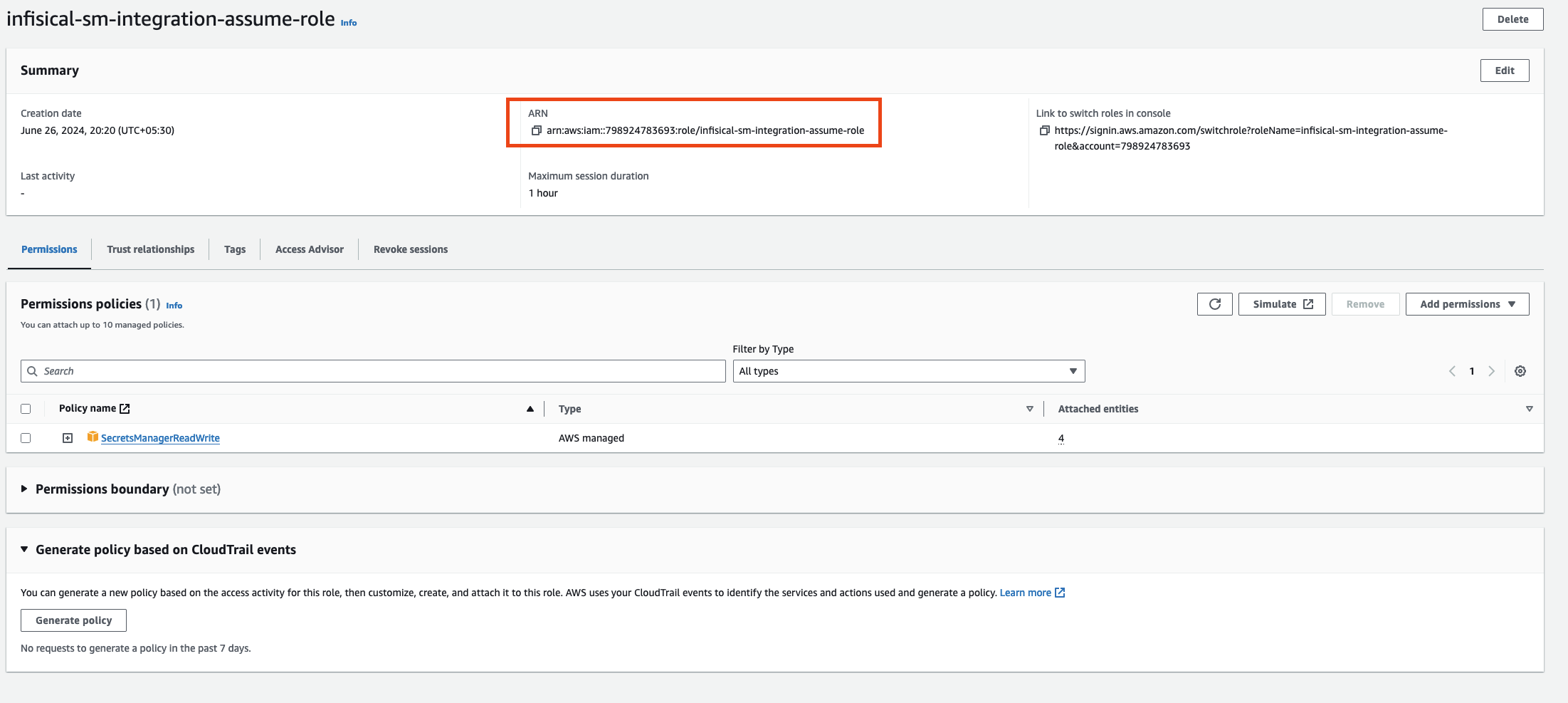
Setup AWS Connection in Infisical
- Infisical UI
- API
-
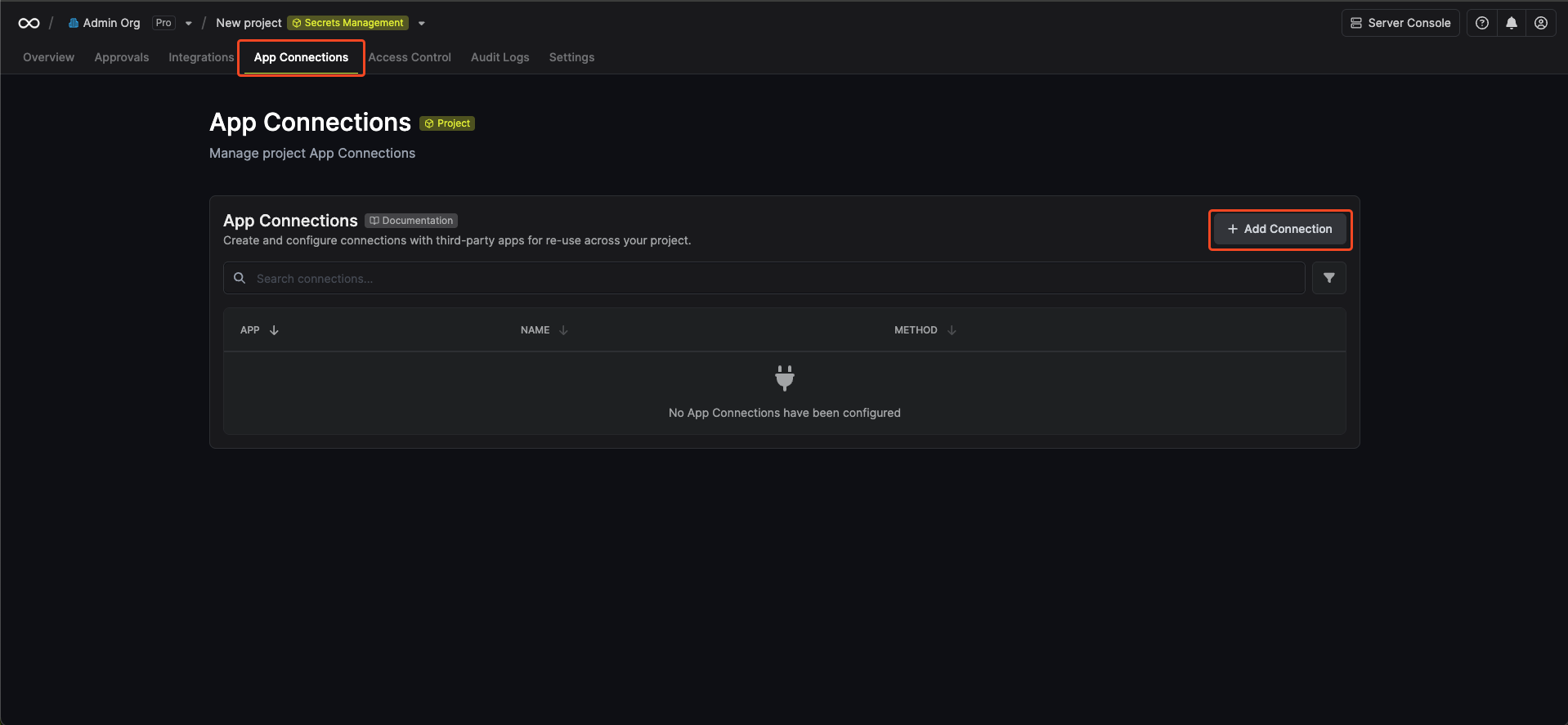
Navigate to the Integrations tab in the desired project, then select App Connections.
-
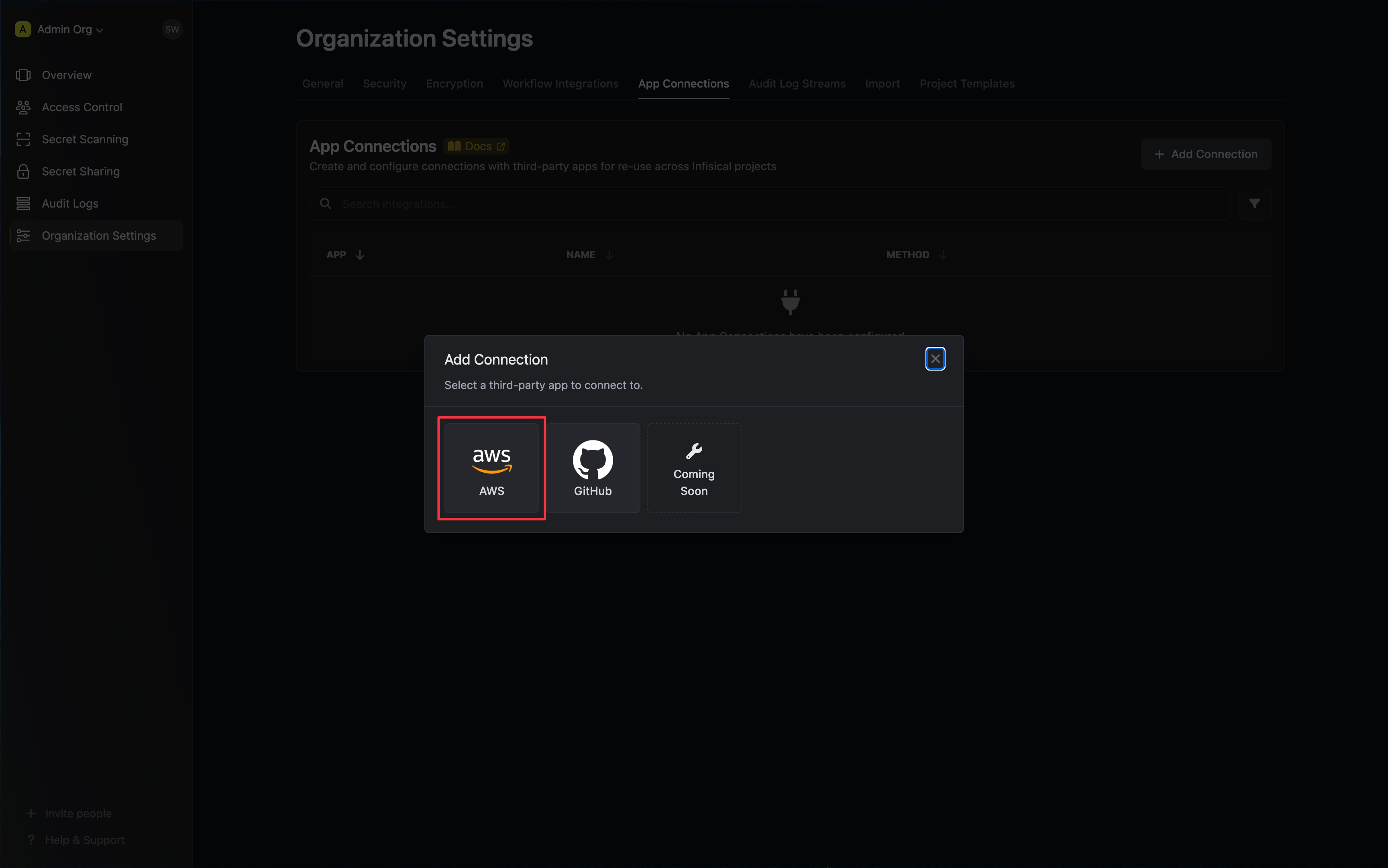
Select the AWS Connection option.
-
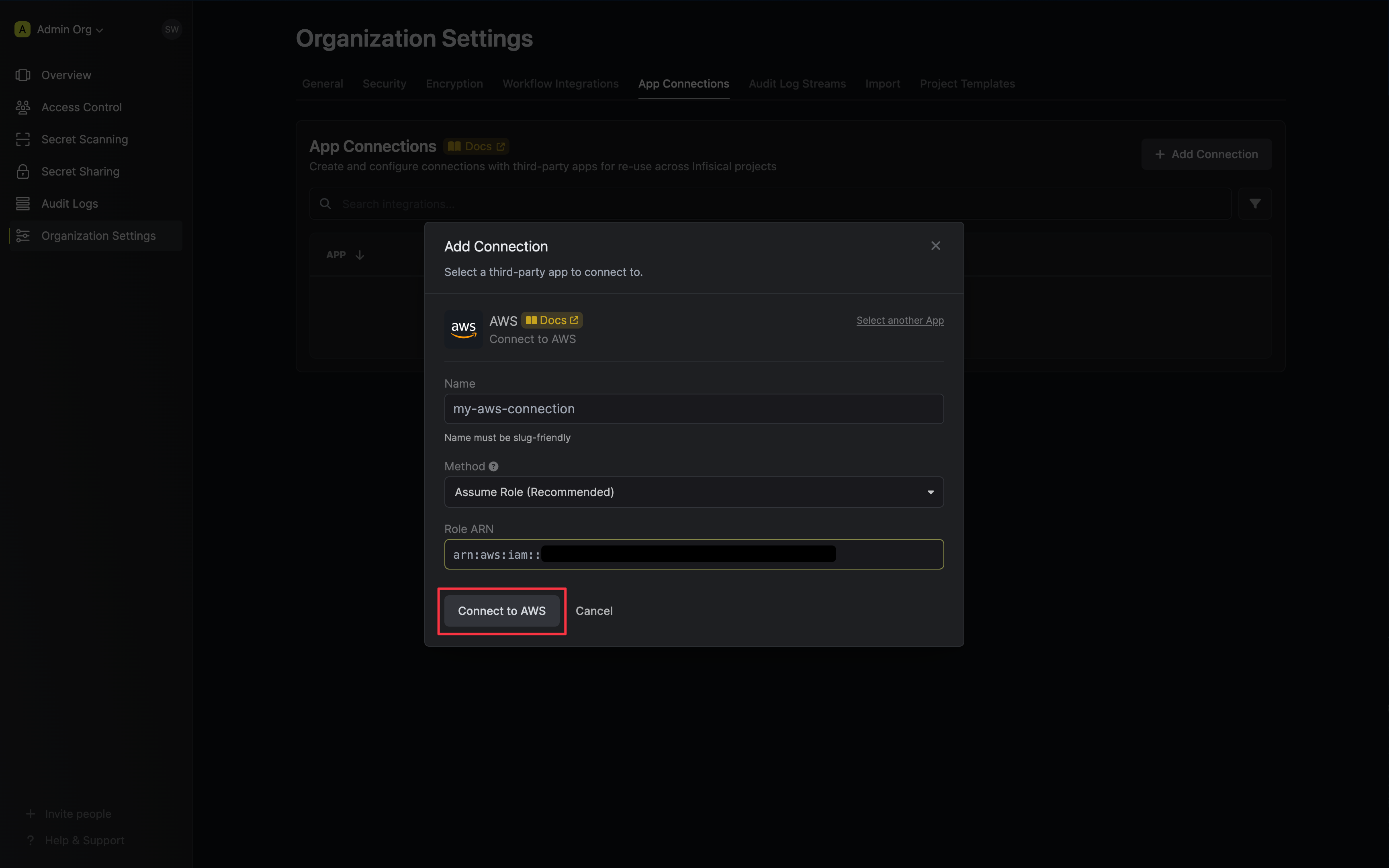
Select the Assume Role method option and provide the AWS IAM Role ARN obtained from the previous step and press Connect to AWS.
-
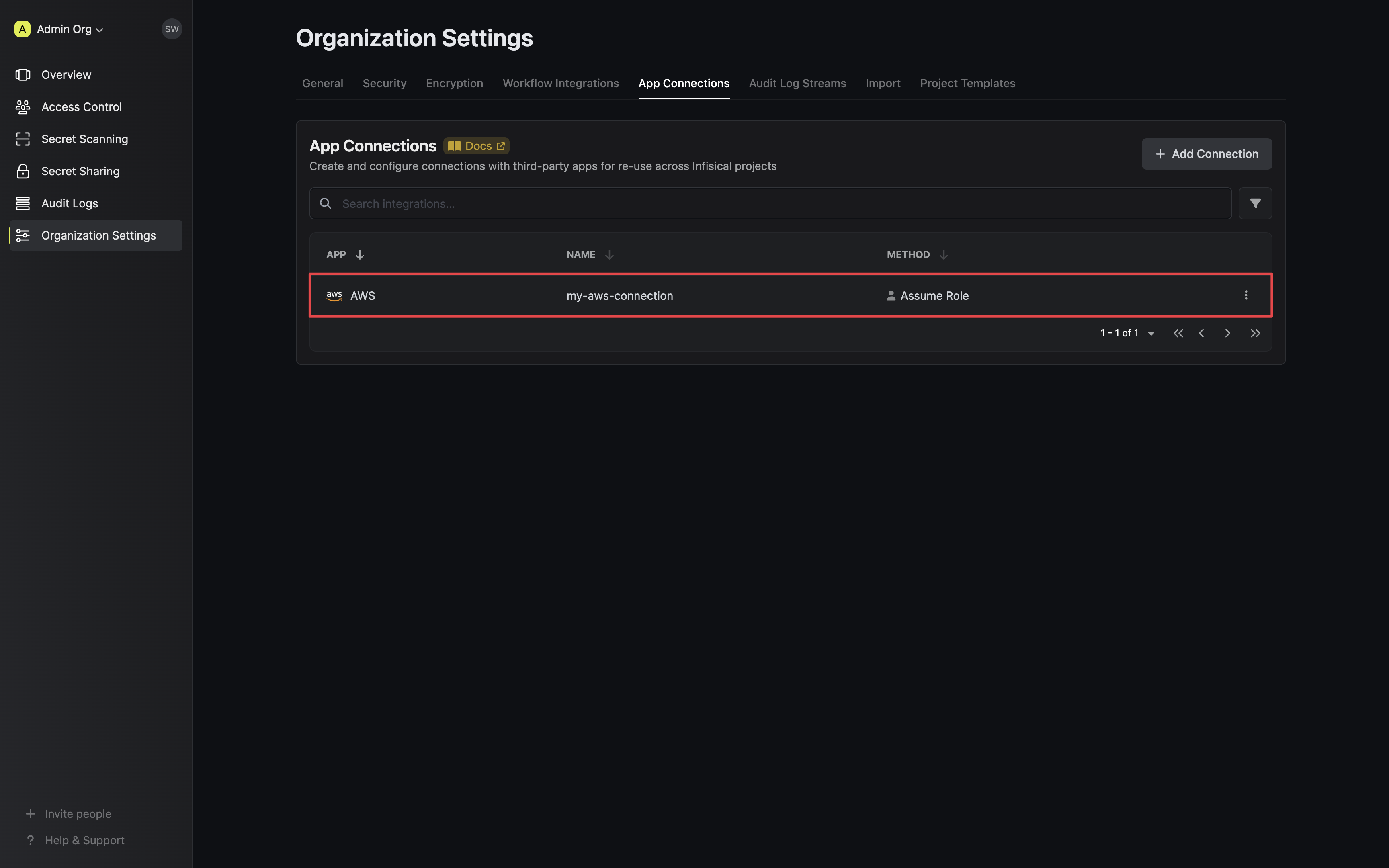
Your AWS Connection is now available for use.
Sample request
curl    --request POST \
        --url https://app.infisical.com/api/v1/app-connections/aws \
        --header 'Content-Type: application/json' \
        --data '{
            "name": "my-aws-connection",
            "method": "assume-role",
            "projectId": "7ffbb072-2575-495a-b5b0-127f88caef78",
            "credentials": {
                "roleArn": "...",
            }
        }'
Sample response
{
    "appConnection": {
        "id": "3c90c3cc-0d44-4b50-8888-8dd25736052a",
        "name": "my-aws-connection",
        "projectId": "7ffbb072-2575-495a-b5b0-127f88caef78",
        "version": 123,
        "orgId": "3c90c3cc-0d44-4b50-8888-8dd25736052a",
        "createdAt": "2023-11-07T05:31:56Z",
        "updatedAt": "2023-11-07T05:31:56Z",
        "app": "aws",
        "method": "assume-role",
        "credentials": {}
    }
}
Add Required Permissions to the IAM User
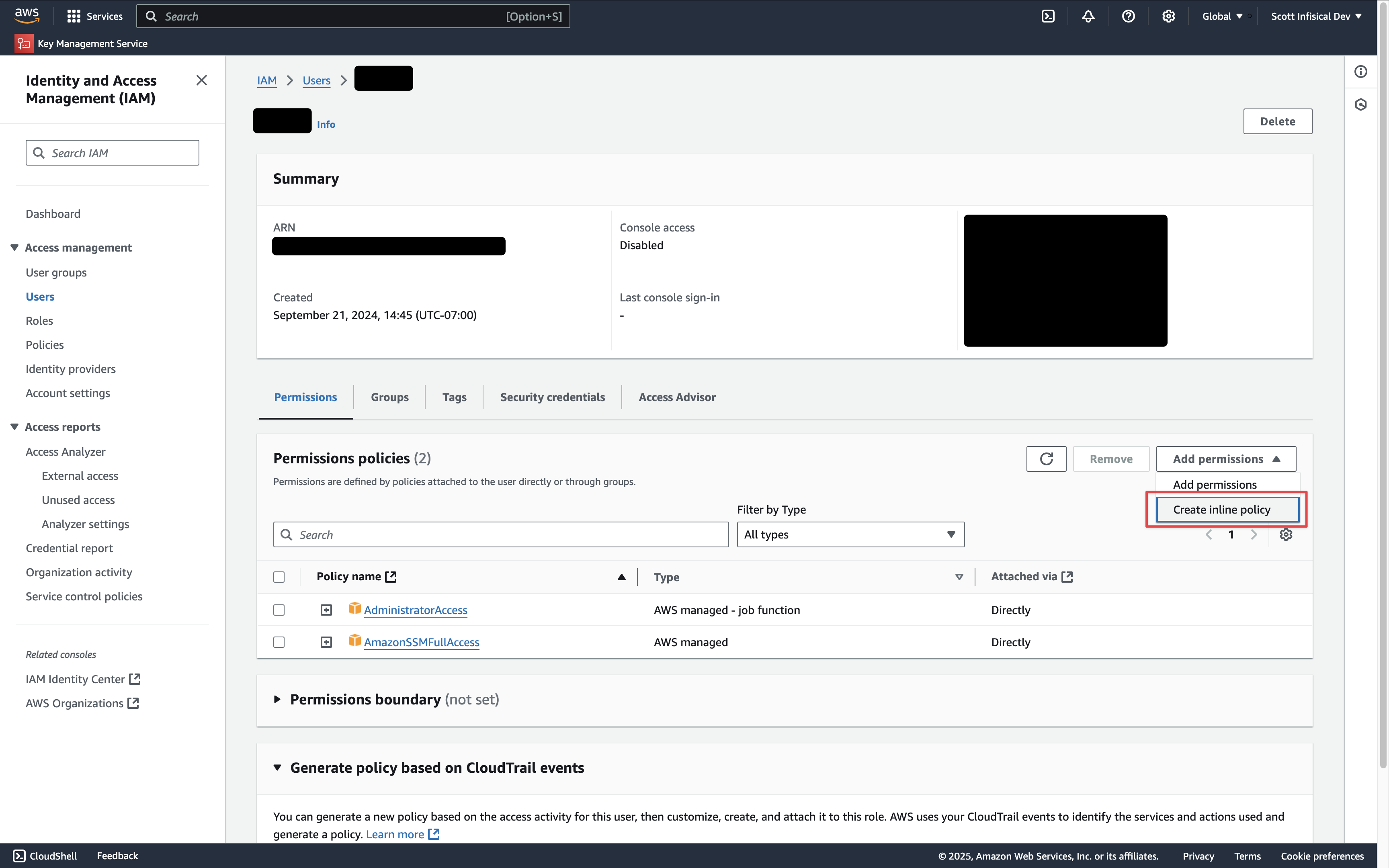 Depending on your use case, add one or more of the following policies to your user:
- Secret Sync
- Secret Rotation
- PKI Sync
- External CA
- PAM Session Recording
AWS Secrets Manager
AWS Secrets Manager
{
    "Version": "2012-10-17",
    "Statement": [
{
    "Sid": "AllowSecretsManagerAccess",
    "Effect": "Allow",
    "Action": [
        "secretsmanager:ListSecrets",
        "secretsmanager:GetSecretValue",
        "secretsmanager:BatchGetSecretValue",
        "secretsmanager:CreateSecret",
        "secretsmanager:UpdateSecret",
        "secretsmanager:DeleteSecret",
        "secretsmanager:DescribeSecret",
        "secretsmanager:TagResource",
        "secretsmanager:UntagResource",
        "kms:ListAliases", // if you need to specify the KMS key
        "kms:Encrypt", // if you need to specify the KMS key
        "kms:Decrypt", // if you need to specify the KMS key
        "kms:DescribeKey" // if you need to specify the KMS key
    ],
    "Resource": "*"
}
    ]
}
AWS Parameter Store
AWS Parameter Store
{
    "Version": "2012-10-17",
    "Statement": [
{
    "Sid": "AllowSSMAccess",
    "Effect": "Allow",
    "Action": [
        "ssm:PutParameter",
        "ssm:GetParameters",
        "ssm:GetParametersByPath",
        "ssm:DescribeParameters",
        "ssm:DeleteParameters",
        "ssm:ListTagsForResource", // if you need to add tags to secrets
        "ssm:AddTagsToResource", // if you need to add tags to secrets
        "ssm:RemoveTagsFromResource", // if you need to add tags to secrets
        "kms:ListAliases", // if you need to specify the KMS key
        "kms:Encrypt", // if you need to specify the KMS key
        "kms:Decrypt", // if you need to specify the KMS key
        "kms:DescribeKey" // if you need to specify the KMS key
    ],
    "Resource": "*"
}
    ]
}
AWS IAM
AWS IAM
{
    "Version": "2012-10-17",
    "Statement": [
        {
            "Effect": "Allow",
            "Action": [
                "iam:ListAccessKeys",
                "iam:CreateAccessKey",
                "iam:UpdateAccessKey",
                "iam:DeleteAccessKey",
                "iam:ListUsers"
            ],
            "Resource": "*"
        }
    ]
}
AWS Certificate Manager
AWS Certificate Manager
{
    "Version": "2012-10-17",
    "Statement": [
        {
            "Sid": "AllowCertificateManagerAccess",
            "Effect": "Allow",
            "Action": [
                "acm:ListCertificates",
                "acm:DescribeCertificate",
                "acm:GetCertificate",
                "acm:ImportCertificate",
                "acm:ExportCertificate",
                "acm:DeleteCertificate",
                "acm:AddTagsToCertificate",
                "acm:RemoveTagsFromCertificate",
                "acm:ListTagsForCertificate"
            ],
            "Resource": "*"
        }
    ]
}
- ListCertificates: Lists all certificates in the account
- ImportCertificate: Imports certificates from Infisical into AWS Certificate Manager
- ExportCertificate: Exports certificates for synchronization
- DeleteCertificate: Removes certificates that are no longer managed by Infisical
- DescribeCertificate and GetCertificate: Retrieves certificate details for comparison during sync
- Tag-related permissions: Manages certificate tags for identification and organization
AWS Elastic Load Balancer
AWS Elastic Load Balancer
{
    "Version": "2012-10-17",
    "Statement": [
        {
            "Sid": "AllowCertificateManagerAccess",
            "Effect": "Allow",
            "Action": [
                "acm:ListCertificates",
                "acm:DescribeCertificate",
                "acm:ImportCertificate",
                "acm:DeleteCertificate",
                "acm:ListTagsForCertificate"
            ],
            "Resource": "*"
        },
        {
            "Sid": "AllowElasticLoadBalancerAccess",
            "Effect": "Allow",
            "Action": [
                "elasticloadbalancing:DescribeLoadBalancers",
                "elasticloadbalancing:DescribeListeners",
                "elasticloadbalancing:DescribeListenerCertificates",
                "elasticloadbalancing:AddListenerCertificates",
                "elasticloadbalancing:RemoveListenerCertificates",
                "elasticloadbalancing:ModifyListener"
            ],
            "Resource": "*"
        }
    ]
}
- ListCertificates: Lists all certificates in the account
- ImportCertificate: Imports certificates from Infisical into AWS Certificate Manager
- DeleteCertificate: Removes certificates that are no longer managed by Infisical
- DescribeCertificate: Retrieves certificate details for comparison during sync
- ListTagsForCertificate: Retrieves certificate tags for identification
- DescribeLoadBalancers: Lists available load balancers for selection
- DescribeListeners: Lists HTTPS/TLS listeners on load balancers
- DescribeListenerCertificates: Lists certificates attached to listeners
- AddListenerCertificates: Attaches certificates to listeners
- RemoveListenerCertificates: Removes certificates from listeners
- ModifyListener: Sets the default certificate on listeners
AWS Private CA
AWS Private CA
Resource to that CA’s ARN:{
"Version": "2012-10-17",
"Statement": [
{
"Sid": "AllowAwsPrivateCAAccess",
"Effect": "Allow",
"Action": [
"acm-pca:DescribeCertificateAuthority",
"acm-pca:GetCertificateAuthorityCertificate",
"acm-pca:IssueCertificate",
"acm-pca:GetCertificate",
"acm-pca:RevokeCertificate"
],
"Resource": "arn:aws:acm-pca:us-east-1:123456789012:certificate-authority/your-ca-id"
}
]
}
Resource array:{
"Version": "2012-10-17",
"Statement": [
{
"Sid": "AllowAwsPrivateCAAccess",
"Effect": "Allow",
"Action": [
"acm-pca:DescribeCertificateAuthority",
"acm-pca:GetCertificateAuthorityCertificate",
"acm-pca:IssueCertificate",
"acm-pca:GetCertificate",
"acm-pca:RevokeCertificate"
],
"Resource": [
"arn:aws:acm-pca:us-east-1:123456789012:certificate-authority/ca-id-1",
"arn:aws:acm-pca:us-west-2:123456789012:certificate-authority/ca-id-2"
]
}
]
}
- DescribeCertificateAuthority: Validates the CA status and configuration
- GetCertificateAuthorityCertificate: Retrieves the CA certificate and chain
- IssueCertificate: Issues certificates from the private CA
- GetCertificate: Retrieves issued certificates
- RevokeCertificate: Revokes previously issued certificates
Resource is recommended over "*" to follow the principle of least privilege.AWS ACM Public CA
AWS ACM Public CA
RequestCertificate cannot be scoped below "*" because the certificate ARN does not exist until after the call succeeds:{
"Version": "2012-10-17",
"Statement": [
{
"Sid": "AllowAcmPublicCaAccess",
"Effect": "Allow",
"Action": [
"acm:RequestCertificate",
"acm:DescribeCertificate",
"acm:ExportCertificate",
"acm:RenewCertificate",
"acm:RevokeCertificate",
"acm:ListCertificates"
],
"Resource": "*"
}
]
}
{
    "Version": "2012-10-17",
    "Statement": [
        {
            "Sid": "AllowRoute53ForAcmValidation",
            "Effect": "Allow",
            "Action": [
                "route53:GetHostedZone",
                "route53:ChangeResourceRecordSets"
            ],
            "Resource": "arn:aws:route53:::hostedzone/YOUR_HOSTED_ZONE_ID"
        }
    ]
}
- RequestCertificate: Requests a new public certificate from ACM
- DescribeCertificate: Retrieves certificate status and DNS validation records
- ExportCertificate: Exports the issued certificate and private key to Infisical
- RenewCertificate: Triggers renewal of an existing certificate
- RevokeCertificate: Revokes a previously issued certificate
- ListCertificates: Used during connection validation
- GetHostedZone: Validates the hosted zone during CA setup
- ChangeResourceRecordSets: Writes the ACM DNS validation CNAME records
AWS S3 Bucket
AWS S3 Bucket
your-pam-recordings-bucket with the bucket name you configure in Project Settings → Session Recording.{
"Version": "2012-10-17",
"Statement": [
{
"Sid": "AllowPamRecordingBucketAccess",
"Effect": "Allow",
"Action": [
"s3:PutObject",
"s3:GetObject"
],
"Resource": "arn:aws:s3:::your-pam-recordings-bucket/*"
},
{
"Sid": "AllowPamRecordingBucketTest",
"Effect": "Allow",
"Action": [
"s3:ListBucket"
],
"Resource": "arn:aws:s3:::your-pam-recordings-bucket"
},
{
"Sid": "AllowPamRecordingConnectionTestCleanup",
"Effect": "Allow",
"Action": [
"s3:DeleteObject"
],
"Resource": "arn:aws:s3:::your-pam-recordings-bucket/.test/*"
}
]
}
pam/prod), update all three Resource ARNs to include the prefix:"Resource": "arn:aws:s3:::your-pam-recordings-bucket/pam/prod/*"
"Resource": "arn:aws:s3:::your-pam-recordings-bucket/pam/prod/.test/*"
- PutObject: Lets the gateway upload encrypted recording chunks via presigned PUT URLs. Also used by the connection test to write a probe object under
{prefix}/.test/{uuid}. - GetObject: Lets the browser fetch encrypted chunks during playback via presigned GET URLs. Decryption happens locally in the browser; Infisical only ever sees ciphertext.
- ListBucket: Required by
HeadBucket, which Infisical calls during the connection test to confirm the bucket exists and the credentials can reach it. - DeleteObject (scoped to
.test/*): Used only to clean up the probe object after the connection test. Infisical never deletes recording chunks. Your bucket lifecycle policy owns retention. When using a key prefix, the test object is written under{prefix}/.test/, so theDeleteObjectresource must include the prefix.
Bucket CORS Configuration
During playback the browser fetches encrypted chunks directly from S3 using presigned GET URLs. For this to work the bucket needs a CORS policy that allows requests from your Infisical domain.Open the bucket in the AWS console, go to Permissions → Cross-origin resource sharing (CORS), and add:[
{
"AllowedHeaders": ["*"],
"AllowedMethods": ["GET"],
"AllowedOrigins": ["https://app.infisical.com"],
"ExposeHeaders": [],
"MaxAgeSeconds": 3600
}
]
https://app.infisical.com with the origin where your Infisical dashboard is served (for example https://eu.infisical.com or http://localhost:8080 during development). You can list multiple origins if needed.Obtain Access Key ID and Secret Access Key
Setup AWS Connection in Infisical
- Infisical UI
- API
-
Navigate to the Integrations tab in the desired project, then select App Connections.
-
Select the AWS Connection option.
-
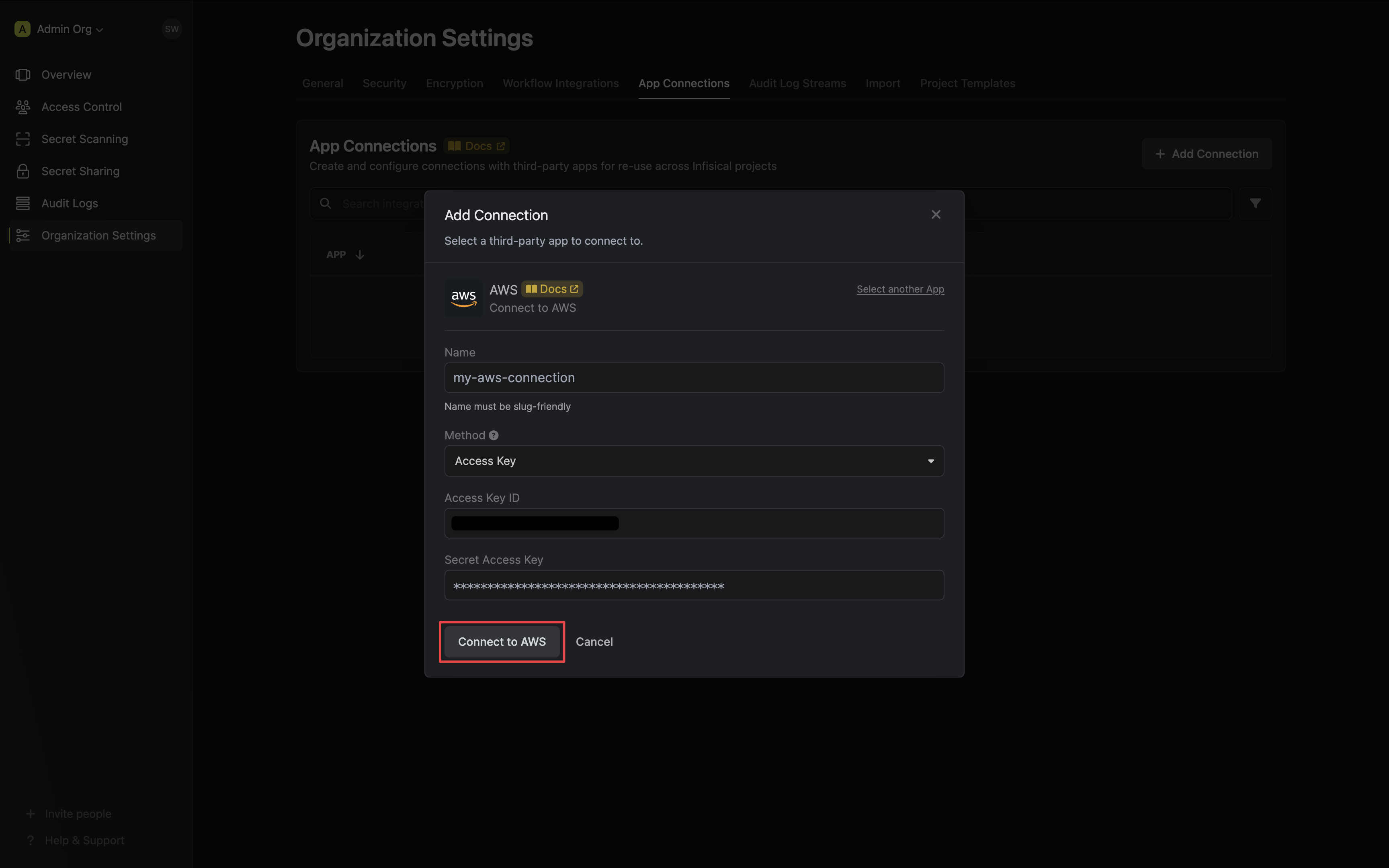
Select the Access Key method option and provide the Access Key ID and Secret Key obtained from the previous step and press Connect to AWS.
-
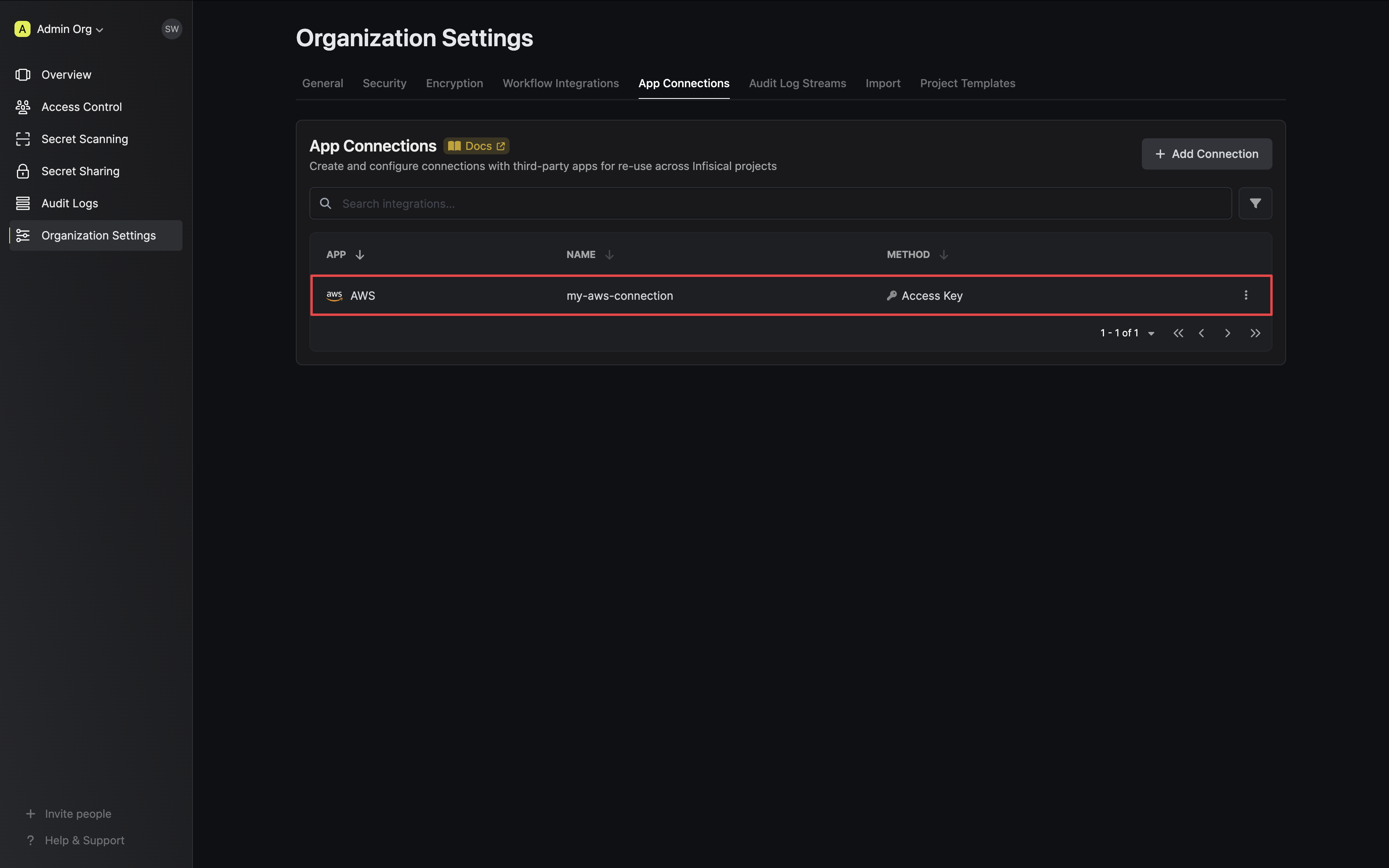
Your AWS Connection is now available for use.
Sample request
curl    --request POST \
        --url https://app.infisical.com/api/v1/app-connections/aws \
        --header 'Content-Type: application/json' \
        --data '{
            "name": "my-aws-connection",
            "method": "access-key",
            "projectId": "7ffbb072-2575-495a-b5b0-127f88caef78",
            "credentials": {
                "accessKeyId": "...",
                "secretKey": "..."
            }
        }'
Sample response
{
    "appConnection": {
        "id": "3c90c3cc-0d44-4b50-8888-8dd25736052a",
        "name": "my-aws-connection",
        "projectId": "7ffbb072-2575-495a-b5b0-127f88caef78",
        "version": 123,
        "orgId": "3c90c3cc-0d44-4b50-8888-8dd25736052a",
        "createdAt": "2023-11-07T05:31:56Z",
        "updatedAt": "2023-11-07T05:31:56Z",
        "app": "aws",
        "method": "access-key",
        "credentials": {
            "accessKeyId": "..."
        }
    }
}