

Documentation Index
Fetch the complete documentation index at: https://infisical-saif-eng-4890-add-support-for-oracle-db-access-in.mintlify.app/llms.txt
Use this file to discover all available pages before exploring further.
Overview
Infisical integrates with AWS Certificate Manager (ACM) to issue public certificates signed by Amazon Trust Services. These certificates are trusted by all major browsers and operating systems out of the box, so they can be used on the public internet without users having to install anything. Common use cases include securing public-facing websites and APIs, terminating TLS on internet-facing load balancers, and issuing certificates for SaaS applications exposed to external users. Each certificate has a fixed 198-day validity and is generated and stored by AWS. Infisical orchestrates the full lifecycle on top: domain validation via Route 53, saving the certificate and private key into Infisical, scheduled auto-renewal, and revocation.Domain validation is performed exclusively through Amazon Route 53. Other DNS providers are not supported for this CA type.
Prerequisites
- Two AWS App Connections: one for ACM, one for Route 53. They can be the same connection if it has permissions for both services.
- A Route 53 public hosted zone for the domains you will issue certificates for.
IAM Permissions
ACM connection — needs the following on certificates in your account:RequestCertificate cannot be scoped below "*" because the certificate ARN does not exist until after the call succeeds.Setup
Copy Your Route 53 Hosted Zone ID
In the AWS Console, navigate to Route 53 → Hosted zones and select the public hosted zone for the domain(s) you will issue certificates for. Copy the Hosted Zone ID from the details panel.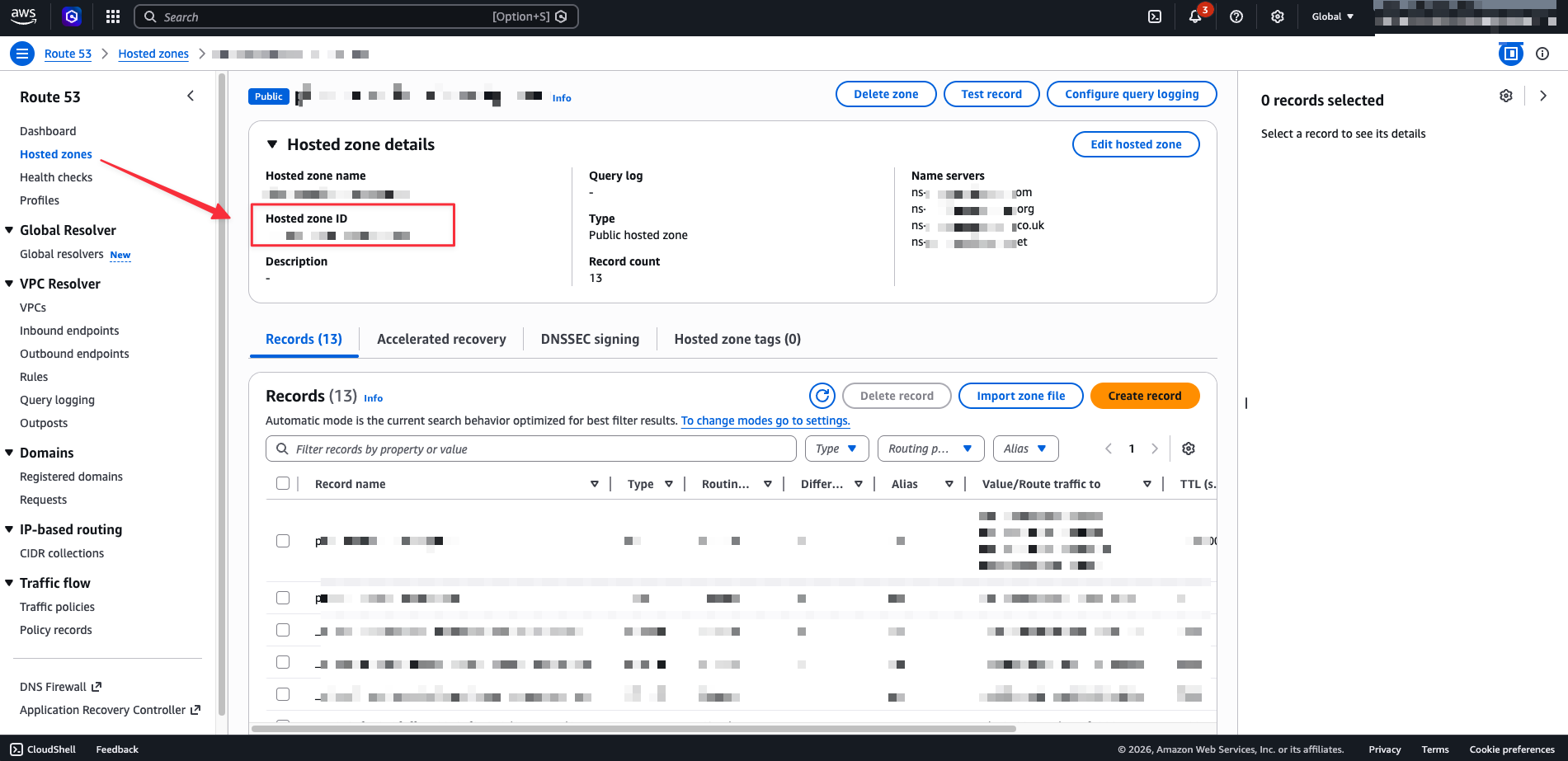
Navigate to External Certificate Authorities
In your Infisical project, go to Certificate Authorities and scroll to the External Certificate Authorities section.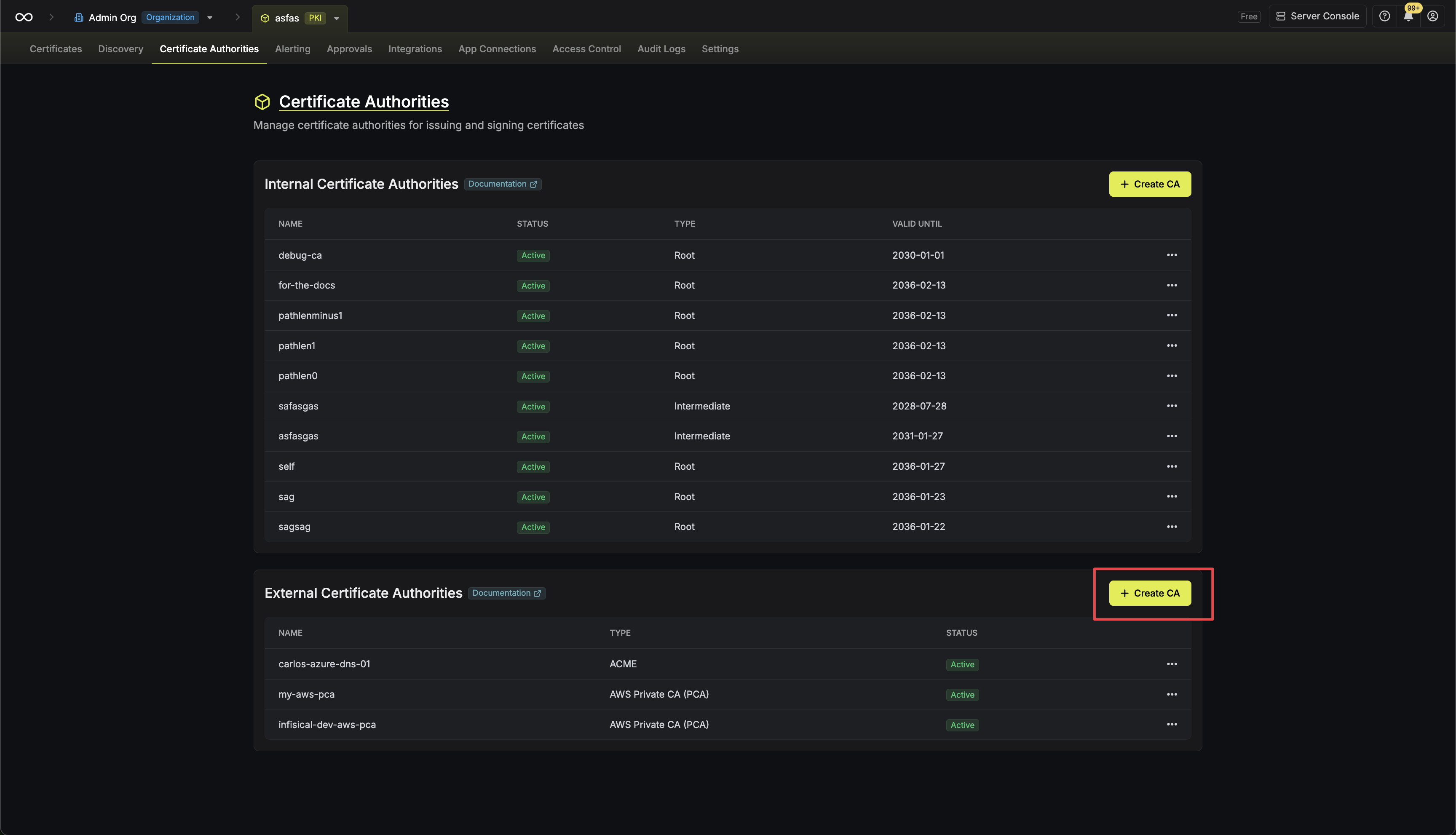
Create the CA
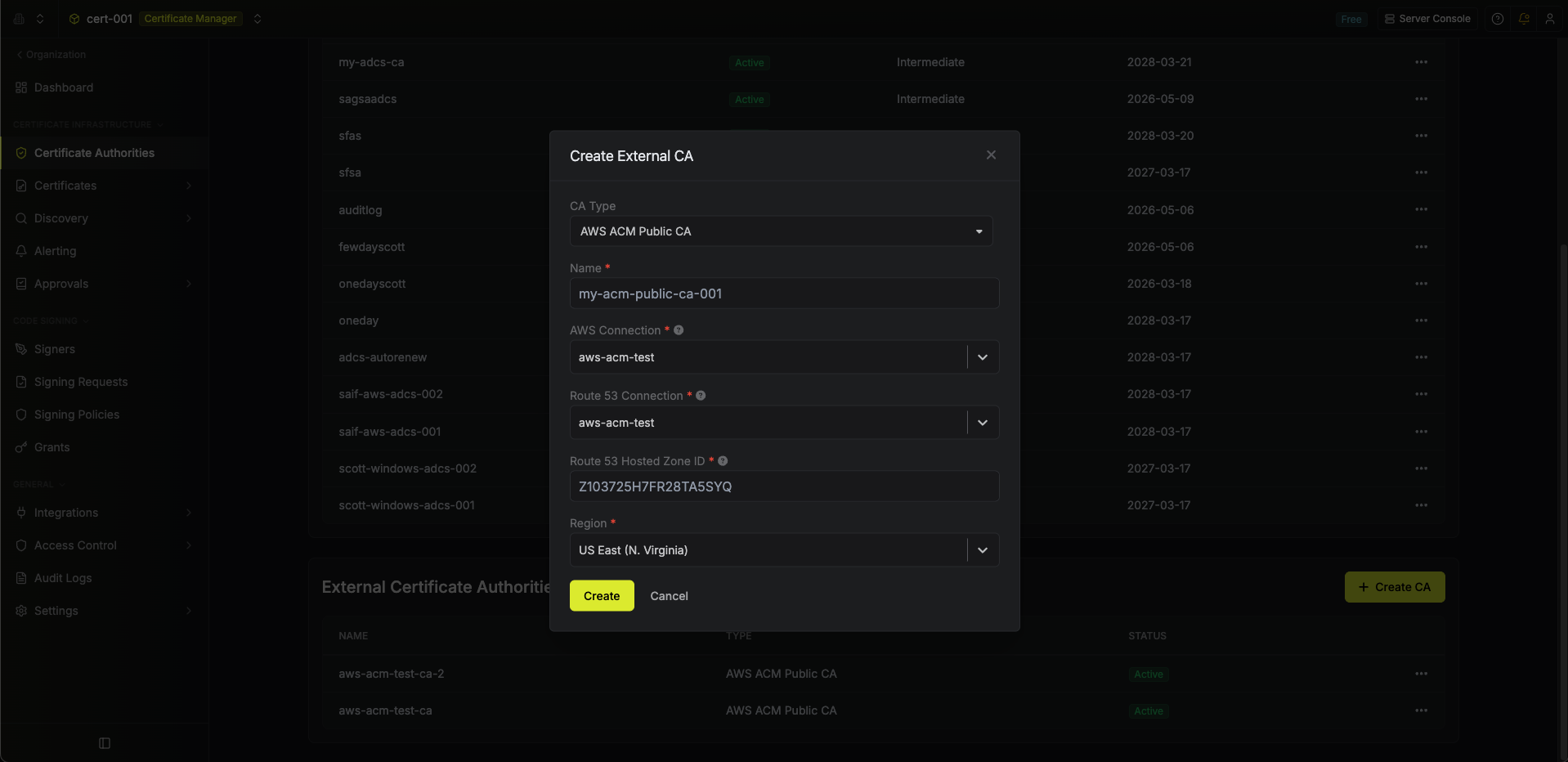
Click Create CA and configure:
- CA Type: AWS ACM Public CA
- Name: lowercase letters, numbers, and hyphens
- AWS Connection: the connection with ACM permissions
- Route 53 Connection: the connection with Route 53 permissions (can be the same as above)
- Hosted Zone ID: the Route 53 public hosted zone ID from the previous step
-
Region: the ACM region to issue from
Auto-Renewal
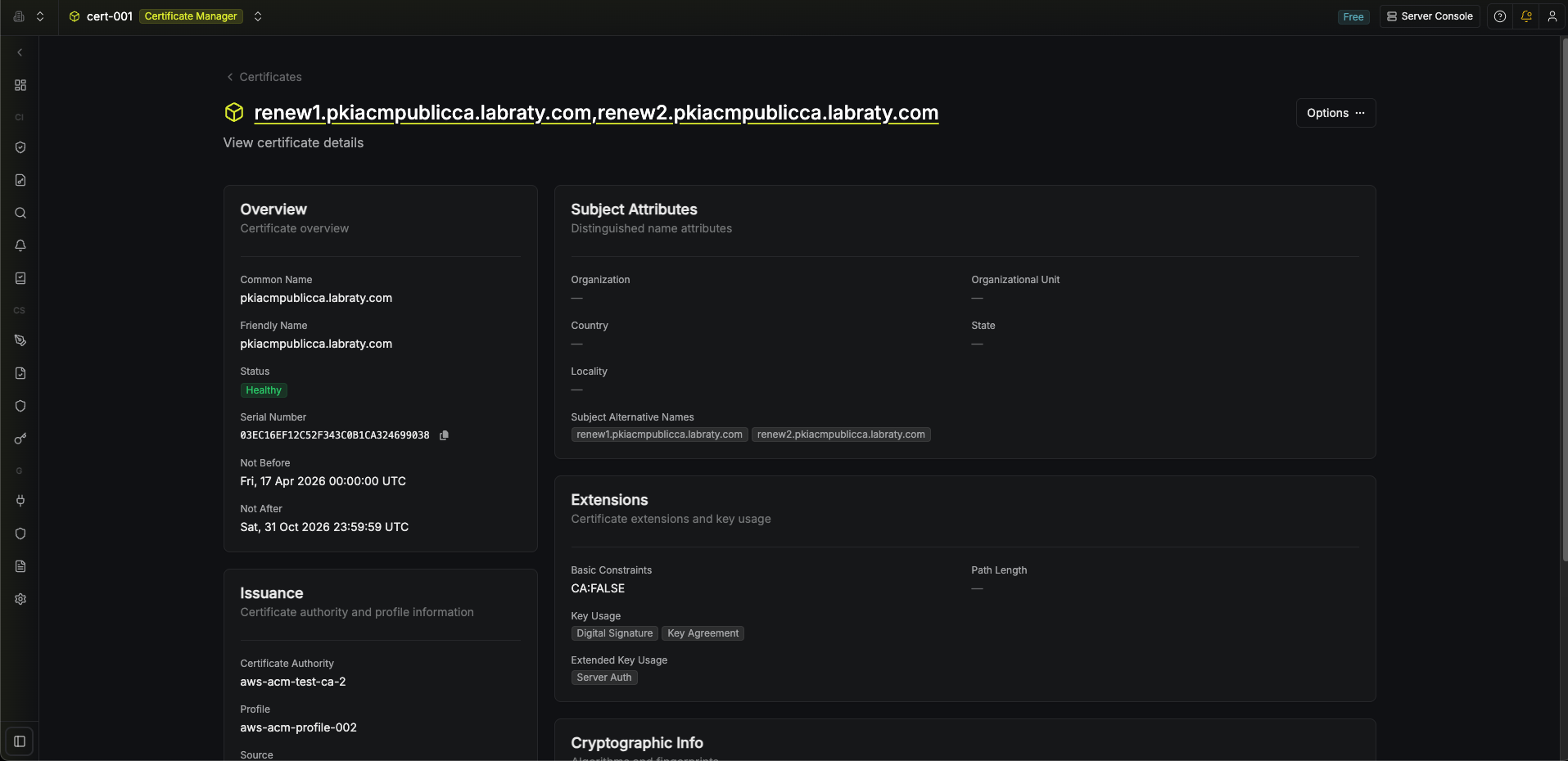
ACM certificates expire after 198 days. There are two renewal paths that both end up producing a fresh certificate in Infisical.AWS managed renewal
AWS attempts to automatically renew ACM public certificates 45 days before expiry. This is ACM managed renewal and happens on AWS’s schedule, independent of Infisical. When it succeeds, AWS issues a new certificate body and private key under the same ARN but with a new serial number. The catch: AWS only updates the copy held inside ACM. The copy saved in Infisical still holds the old material until something pulls the new version out.Infisical auto-renewal
To keep the copy stored in Infisical in sync with AWS, enable auto-renewal on the certificate profile when you create or edit it:- Auto-renew: enabled
- Renew before days: how many days before expiry renewal should fire (1–30 days)
- If AWS has already renewed the certificate on its own, Infisical pulls in the new certificate and private key.
- If AWS has not yet renewed, Infisical triggers renewal, waits for ACM to finish re-issuance, then saves the new material.
AWS generates a fresh private key on every renewal. Infisical pulls it in each time and stores it encrypted with your project’s KMS key.
Troubleshooting
Failed to reach AWS Certificate Manager — the ACM connection credentials are invalid or missing the IAM permissions above.
Failed to access Route 53 hosted zone — the Route 53 connection cannot read the hosted zone, or the Hosted Zone ID is wrong. Check route53:GetHostedZone and that the zone is public.
Request stays pending — DNS validation can take several minutes. Infisical retries automatically. Verify the CNAME records exist in Route 53 and that the hosted zone is authoritative for the requested domain.
Renewal appears stuck — immediately after renewal is triggered, ACM may not yet have the new certificate available. Infisical treats this as transient and retries until a new serial number appears on the ARN.
FAQ
What's the certificate validity period? Can I change it?
What's the certificate validity period? Can I change it?
AWS issues every ACM public certificate with a fixed 198-day validity.
Which DNS providers are supported for domain validation?
Which DNS providers are supported for domain validation?
Only Amazon Route 53. Infisical writes the required CNAMEs through your Route 53 connection.
Can I provide my own CSR or private key?
Can I provide my own CSR or private key?
No. ACM generates the key pair itself. Infisical pulls the certificate and private key from ACM and stores them encrypted.
Which key algorithms are supported?
Which key algorithms are supported?
RSA_2048, EC_prime256v1 (ECDSA P-256), and EC_secp384r1 (ECDSA P-384).Can I set subject fields like Organization or Country?
Can I set subject fields like Organization or Country?
No. ACM does not accept subject fields beyond the common name (O, OU, C, ST, L are ignored).
Can I customize key usages or extended key usages?
Can I customize key usages or extended key usages?
No. ACM applies its own policy on every issued certificate.
Which enrollment methods are supported?
Which enrollment methods are supported?
Certificate profiles backed by AWS ACM Public CA support only API enrollment. EST, SCEP, and ACME rely on submitting a CSR for the CA to sign, but ACM generates the private key itself and does not accept a CSR.
Can I issue a CA / intermediate certificate?
Can I issue a CA / intermediate certificate?
No. ACM Public CA only issues end-entity (leaf) certificates.